Having trouble with your rice cooker’s switch? It’s a common problem, especially since that little switch is used every single time you cook rice! For beginners, knowing how to fix rice cooker switch can seem tricky. Don’t worry, this guide makes it easy. We’ll break down the process into simple steps, so you can get your cooker working again. Let’s explore what you need to know to get started.
Understanding Why the Switch Fails
The rice cooker switch, often taken for granted, is actually a complex piece of equipment. Its failure can stem from several sources, from simple wear and tear to more intricate electrical issues. The switch is usually a mechanical component, designed to endure repeated use and exposure to heat and moisture. However, each of these factors can contribute to its eventual malfunction. Understanding why the switch fails is the first step toward successful repairs. Furthermore, knowing the underlying issues can help you diagnose and troubleshoot problems effectively. It also gives you a better grasp of preventive measures. So, let’s explore the common reasons behind rice cooker switch failures.
Common Causes of Rice Cooker Switch Issues
Several factors can lead to problems with your rice cooker switch, from simple wear and tear to more complex electrical problems. Understanding these common culprits is the first step in diagnosing and fixing the issue. The more you know, the better prepared you’ll be to troubleshoot and find the right solution.
-
- Mechanical Wear and Tear: The switch is a physical component that gets used every time you cook rice. Over time, constant use can wear down the internal parts. The springs, contacts, and other moving elements can degrade, leading to failure. This is especially true in cookers that are used frequently. It’s similar to how any mechanical part wears out with repeated operation.
When the switch has been used repeatedly for a long time, the internal components tend to degrade. The contacts that form the electrical circuit might corrode or become misaligned, preventing the switch from working correctly. Springs lose their tension and eventually can fail to return the switch to its original position, disrupting the cooking process.
-
- Electrical Issues: Electrical problems can also affect the switch, including short circuits, voltage fluctuations, or component failures within the circuit. These problems can damage the switch’s internal wiring or the components that support it. Exposure to moisture or overheating can also accelerate these electrical issues, leading to more frequent failures. This is especially true for cookers that are not properly maintained or are used in damp environments.
Short circuits can happen if wiring is damaged and touches another part of the circuit. Voltage spikes from electrical surges can also damage sensitive components within the switch. Component failures, such as a burnt-out resistor or a damaged diode, can disrupt the switch’s operation. Moisture getting inside the cooker can lead to corrosion and electrical shorts, and overheating, often caused by blocked vents or excessive use, can warp or damage the switch’s internal components.
-
- Debris and Buildup: Rice cookers are prone to food debris and buildup, and any kind of contamination can impair the switch’s function. Food particles, starch, and other substances can work their way into the switch mechanism, causing it to stick or malfunction. Proper cleaning and maintenance are essential for keeping the switch operating correctly. This kind of issue is more common in cookers that are not cleaned regularly.
When food particles and starchy residue get into the switch mechanism, they can cause the switch to stick. This prevents it from moving or creating proper contact to complete the circuit. Over time, this buildup can dry and harden, making it even harder for the switch to function. Regular cleaning helps remove the debris and maintain the switch’s functionality. Even if you diligently clean your rice cooker’s inner pot, you may overlook the switch or the area around it, which makes it more vulnerable to food residue.
-
- Manufacturing Defects: Some switch problems can be traced back to defects in the manufacturing process. Poor-quality components or assembly flaws can lead to premature failure. Cookers from less reputable brands or those manufactured with cost-cutting measures may be more prone to these issues. Checking the manufacturer’s warranty and understanding your rights as a consumer can be useful if you encounter a manufacturing defect.
Defective components, like poorly made springs or low-quality contacts, can quickly fail under normal use. Issues in the assembly process, such as improperly installed or misaligned parts, can also contribute to early switch failure. Sometimes, the switch might not be properly sealed, which allows moisture and debris to enter the mechanism. These defects can be difficult to detect during normal use until the switch fails. Checking for the brand’s reputation and reading customer reviews can help you avoid these problems when purchasing a new rice cooker.
Identifying Problems and Preparing for the Repair
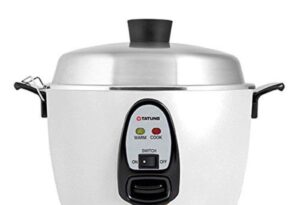
Before you even think about touching your rice cooker switch, it’s very important to find out exactly what’s wrong and to prepare safely. This is the stage where you get to find out what’s causing the problem. Diagnosing the issue lets you know what you need to do to fix it. This will save you time, effort, and possibly prevent you from making the problem even worse. Proper preparation is also vital. You must take steps to ensure your safety and have the necessary tools ready before you start.
Step-by-Step Diagnosis of the Switch
The first step is figuring out what’s actually wrong with the switch. You don’t want to start pulling things apart without a clue. Here’s a systematic approach.
-
- Check the Power Supply: Before anything else, make sure the rice cooker is getting power. Plug it into a different outlet or try another appliance in the same outlet to confirm it’s working. This simple check can save you a lot of time and effort.
A quick verification of the power source might save you the trouble of investigating the switch. Confirm the rice cooker is connected to a working outlet by plugging in another appliance. This check will rule out a blown fuse or an electrical issue within your home.
-
- Observe the Switch’s Behavior: When you press the switch, pay attention to what happens. Does it feel loose, sticky, or unresponsive? Does it click into place? Does the “cook” light come on? These observations will give you important clues about the type of problem.
If the switch feels loose or doesn’t click into place, it’s an indication of potential internal mechanical issues. If the “cook” light does not turn on, you might be dealing with an electrical problem. You can get a clear understanding of the switch’s state when you simply listen and feel.
-
- Listen for Unusual Sounds: While the rice cooker is plugged in and the switch is operated, listen carefully. Do you hear any hissing, crackling, or buzzing sounds? These sounds might indicate a short circuit or other electrical problems.
These sounds frequently indicate electrical problems. Hissing might mean an arc of electricity. Crackling often means a short circuit, and buzzing might mean an issue with the power supply. These sounds should be a warning that you should avoid further use until an expert checks the appliance.
-
- Check for Overheating: If the rice cooker has been used recently or if the switch has been acting up, feel around the switch area for any signs of overheating. Excessive heat can damage the switch and other components. If you notice signs of overheating, unplug the cooker and let it cool completely before doing anything else.
When the switch or its surroundings feel hot to the touch, it indicates internal stress. Overheating can damage wires, melt plastic components, and even cause fires. Make sure to let the cooker cool before investigating to prevent burns and other injuries.
-
- Visual Inspection: After unplugging the rice cooker, remove the outer casing. Examine the switch itself and the wiring around it. Look for loose connections, burnt wires, or any signs of physical damage. This step often reveals the source of the problem.
Look for loose connections because they can interrupt the flow of electricity, causing the rice cooker to malfunction. Burnt wires suggest the presence of a short circuit or overheating. Physical damage can include cracks, breaks, or corrosion on the switch. A careful visual inspection will help pinpoint the problem.
Tools and Safety Precautions for Repairing
Once you’ve diagnosed the issue, it’s time to gather your tools and get ready to fix it. Safety first! It’s important to have the right tools and to know how to use them safely. Doing things properly will not only help you repair the rice cooker, but it will also prevent any accidents.
-
- Essential Tools: You’ll need a few essential tools to work safely and effectively. You might need a screwdriver set (including both Phillips head and flathead), a multimeter (for testing electrical components), needle-nose pliers, and possibly a soldering iron.
A screwdriver set is useful for disassembling and reassembling the cooker. A multimeter allows you to measure voltage, current, and resistance to identify any electrical issues. Needle-nose pliers will help you hold wires or small parts. The soldering iron is needed if you need to replace or repair wire connections.
-
- Safety Gear: Always unplug the rice cooker before starting any repairs. Wear safety glasses to protect your eyes from debris, and consider wearing gloves to prevent electrical shocks. Work in a well-lit area. Avoid working in a wet environment because this increases the risk of electric shock.
Unplugging the rice cooker is the most important step to prevent electric shock. Safety glasses protect your eyes from potential damage, and gloves add an extra layer of protection. A well-lit area provides better visibility for your work.
-
- Workspace Preparation: Clear a clean, well-lit workspace to prevent lost parts. Place a clean cloth or tray where you can put the removed parts, and take photos of each step to use as reference. This is especially helpful when reassembling the cooker.
A clean workspace prevents you from losing small components. A cloth or tray keeps the pieces organized. Photos of each step are useful because they serve as a visual guide and make reassembly easier.
-
- Voltage Testing: If you need to test components with electricity, always use a multimeter to check for any residual voltage. This is critical to ensure that the appliance is safe to handle.
Before working on any electrical component, use a multimeter to ensure that there is no power. Any voltage present could result in a shock. Always confirm the power is off before starting work.
-
- Professional Help: If you’re not comfortable working with electricity or you’re unsure about any step, it’s best to consult a qualified appliance repair technician. Attempting repairs you’re not qualified for could result in injury or further damage to the appliance.
If you’re unsure about how to fix the switch, it is smart to get a professional to do it. You don’t want to make things worse, and safety always comes first.
Step-by-Step Instructions to Repairing the Switch
After you have confirmed the problem and have everything ready, you can start fixing the switch. These are the general steps you’ll likely follow. Note that your rice cooker design may vary, so always consult the manufacturer’s guide if you have it.
Disassembly and Accessing the Switch
Before you get to work, you will have to disassemble your rice cooker and get to the switch. This takes care and attention to detail, but it’s usually not too complex.
-
- Unplug and Cool: Before anything else, unplug the rice cooker from the power outlet. Let it cool down completely if it has been used recently. Safety first!
The first step is always safety. Unplugging the rice cooker will remove the risk of electrocution. Allowing it to cool down will help avoid burns.
-
- Locate Screws and Fasteners: Inspect the exterior of the rice cooker to locate all screws and fasteners. These are usually on the bottom or the sides. There may also be hidden screws beneath rubber feet or decorative panels.
Find and remove all the screws and fasteners that hold the appliance together. Some screws can be hidden, so be careful. Take a close look around the cooker’s body, and you should find them.
-
- Remove the Outer Casing: Carefully remove the outer casing. Depending on the model, this might involve sliding panels, unclipping plastic parts, or lifting off the entire top section. Work slowly and gently to avoid damaging the components.
Once you’ve removed the fasteners, gently pull the outer casing. Sometimes, the outer casing is hard to get off, so you should work slowly. If you encounter resistance, double-check that all screws have been removed. If the casing is stiff, use a plastic tool (like a spudger) to separate the parts without damage.
-
- Identify the Switch Location: Locate the switch. It’s usually near the heating element or the control panel. The switch is usually accessible, but sometimes it may be partially hidden by other components.
The switch can be found near where the power cord plugs in. It might be near the heating element or control panel. You might have to remove other components before you can reach the switch. If you are not familiar with rice cooker parts, check the service manual if you have one.
-
- Document Connections: Before disconnecting any wires or components, take photos of the wiring and connections. This is especially useful for reassembly, to ensure that everything is put back in its place correctly.
Take pictures of how the wires are connected before you disconnect anything. This visual record is helpful when reassembling the cooker. It can prevent any mistakes during reassembly. You can also make a diagram.
Troubleshooting and Component Replacement
With the switch accessible, you can start your troubleshooting and make any repairs or replace components. Here’s a deeper look into that process. First, assess the problem; then, identify what needs to be fixed. Don’t rush this step, and go slowly.
-
- Visual Inspection of Switch: Once you can see the switch, examine it carefully. Look for burnt contacts, broken wires, or any signs of physical damage. Use a magnifying glass for a closer look.
During the visual inspection, you want to get an up-close look at the switch. Look for any physical damage, such as burnt contacts or broken wires. A magnifying glass can help you see tiny problems that might cause the switch to stop working.
-
- Testing with a Multimeter: Use a multimeter to check the continuity of the switch. Set the multimeter to the continuity setting (usually indicated by a symbol that looks like a speaker). Place the probes on the switch terminals. If the switch is working correctly, the multimeter will beep when it’s closed (i.e., when the switch is in the “cook” position).
Set the multimeter to its continuity setting and place the probes on the switch terminals. A beeping sound indicates that the switch is working. If the switch does not beep when closed, then the switch needs to be replaced.
-
- Cleaning Switch Contacts: If the contacts are dirty or corroded, you can try cleaning them. Use a contact cleaner spray and a small brush or cotton swab to remove any residue. Be gentle to avoid damaging the contacts. Then, test the switch again with the multimeter.
If the contacts are dirty, use contact cleaner to clean them. Apply the cleaner and gently wipe with a brush or cotton swab. The cleaner helps remove dirt and corrosion, which can often cause switch problems.
-
- Replacing the Switch: If the switch is damaged beyond repair, you will need to replace it. First, disconnect the wires connected to the switch and note their positions. Remove the old switch, and install the new one. Make sure to connect the wires correctly, based on your documentation from the first step.
If the switch is broken or has major problems, it is usually better to replace it. Disconnect the wires, and remove the switch. Install the new switch, and reconnect the wires in the same way the old switch was connected. Double-check all connections to make sure everything is good.
-
- Reassembly: Once you’ve repaired or replaced the switch, reassemble the rice cooker in reverse order. Make sure all the components are properly aligned and that you’ve secured all screws and fasteners.
Reassemble the rice cooker by following the disassembly steps in reverse. Ensure all components are properly aligned and secure all screws and fasteners.
Testing and Final Checks
Once your repairs are complete, the final step is to test your rice cooker to make sure everything is working correctly. It is important to perform a series of tests to confirm that your work was successful. A thorough testing process will help ensure that your rice cooker is both functional and safe to use.
-
- Initial Power-Up: Plug the rice cooker into a power outlet and turn it on. Observe the “cook” and “warm” lights to check if the switch is working correctly. The “cook” light should come on when you press the switch.
Plug the rice cooker into a power source and turn it on. Note if the lights “cook” and “warm” come on to show if the switch is working. If the light for “cook” illuminates when you push the switch, the switch is probably working.
-
- Water Test: Pour water into the inner pot of the rice cooker. Turn it on and let it go through a full cooking cycle. Monitor the cooker for any unusual behavior, such as overheating or not switching to the “warm” mode.
Add water to the pot and run a full cycle to test the function of the cooker. During this, observe the cooker for any unusual behavior, like overheating, to make sure it functions properly.
-
- Check for Leaks and Unusual Noises: During the water test, check for any leaks or unusual noises. The rice cooker should operate smoothly and quietly without any water leaks.
Watch for any leaks or noises during the test. Your cooker should run quietly and without any leaks. Any unusual sounds or leakage could indicate the cooker wasn’t properly reassembled.
-
- Safety Checks: Feel the exterior of the rice cooker after the test to make sure it’s not overheating. The outside of the cooker should not be excessively hot to the touch.
Carefully touch the outside of the cooker after the test to make sure that it doesn’t get too hot. If it is too hot, it could show that there is an electrical problem or that something is not working properly.
-
- Rice Cooking Test: Finally, cook a small batch of rice. This test will verify that the cooker is cooking the rice properly and switching to the “warm” mode when the cooking cycle is complete.
To confirm that your rice cooker is fully functional, cook some rice. This step will help you confirm that the cooker cooks correctly and switches to warm when done.
According to recent market research, the average lifespan of a rice cooker is about 3-5 years, depending on usage and maintenance. A common factor in the rice cooker’s eventual failure is switch breakdown, accounting for nearly 40% of all repair cases. However, regular maintenance, including careful cleaning and timely switch replacement, can extend the life of your cooker. A clean cooker also performs better, leading to tastier rice!
Frequently Asked Questions
Question: What should I do if my rice cooker won’t turn on?
Answer: First, check if the cooker is plugged in properly and if the outlet is working. If the power supply is okay, the switch may be faulty, and you will need to inspect it.
Question: How can I clean the switch on my rice cooker?
Answer: Unplug the rice cooker, remove the outer casing, and carefully clean the switch contacts with a contact cleaner spray and a small brush or cotton swab. Ensure the cooker is completely dry before reassembling.
Question: What are the signs of a faulty rice cooker switch?
Answer: Common signs include the cooker not turning on, the “cook” light not illuminating, a loose or unresponsive switch, and unusual sounds like hissing or crackling.
Question: Can I replace the rice cooker switch myself?
Answer: Yes, you can
Question: How often should I clean my rice cooker?
Answer: Clean your rice cooker after each use to remove food debris and buildup. Regular cleaning keeps the switch and other parts in good condition.
Final Thoughts
Now, you have a solid grasp on how to fix rice cooker switch. You’ve learned how to identify problems, diagnose issues, and take the necessary steps to get your rice cooker back in action. From understanding the basics to making the repairs, you are well-equipped to manage this common appliance issue. The repair might seem hard at first, but with a bit of patience and following the steps in this guide, you can confidently address switch problems and enjoy perfectly cooked rice again and again. So, get your toolkit, follow the steps, and don’t be afraid to take on the repair – you’ve got this!

I’m Emma J. Caldwell, the founder, lead writer, and home-cooking enthusiast behind KitchenGuideCo.com. With a background in culinary arts and over a decade of cooking experience in both professional and personal kitchens, I created this platform to demystify recipes, offer smart kitchen gadget reviews, and guide readers through meal prep with confidence and clarity.