Many LG dishwasher owners panic the first time they see the letters CL on the display panel. They assume it means a major malfunction or an expensive repair.
The dishwasher suddenly stops responding to button presses, and controls become locked. People press buttons repeatedly, but nothing changes.
This creates confusion because the machine looks perfectly normal, yet it refuses to start or cancel a cycle. The CL code feels mysterious when you do not know what triggered it.
In most cases, the CL message is harmless. It simply means the child lock feature has been activated.
This safety feature prevents accidental button presses, especially in homes with kids or pets. But many people activate it by mistake without realizing it.
Understanding what CL means helps you unlock the machine quickly and continue washing dishes without stress.
What Does CL Mean On An LG Dishwasher
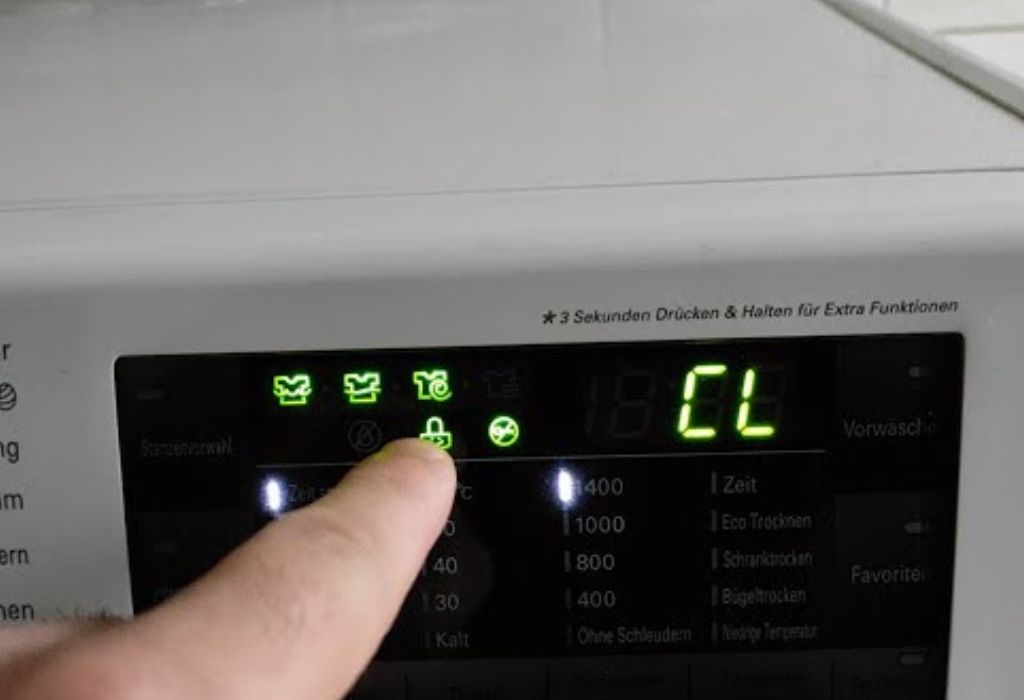
The CL code on an LG dishwasher stands for child lock. This feature disables the control panel so no buttons work until the lock is removed.
People often trigger the lock accidentally while wiping the panel or leaning against the machine. This makes the display show CL suddenly.
Child lock protects children from starting or stopping cycles by pressing random buttons. It also prevents settings from being changed during a wash.
When CL is active, the dishwasher will not begin a new cycle. The buttons appear dead or frozen.
Removing the lock instantly restores all functions.
Is CL an error code
No, it is not an error. It is a safety feature.
Does CL mean something is broken
The dishwasher is working normally. Only the controls are locked.
Can LG dishwashers run with CL active
No, the controls must be unlocked first.
Why does CL appear suddenly
Accidental button presses activate it.
Is child lock useful
It prevents accidental operation effectively.
Why LG Dishwashers Have A Child Lock Feature
Child lock exists to prevent small children from playing with the dishwasher buttons. Kids often push buttons out of curiosity.
It also protects cycles from being interrupted. Changing settings mid cycle can waste water and detergent.
Homes with pets benefit too because paws can trigger the control panel. Cats walking on the door commonly press buttons.
The feature also stops accidental cleaning changes when adults lean against the dishwasher. Kitchen chores sometimes involve bumping the control panel.
Dishwasher safety and convenience improve greatly with this simple feature.
How To Turn Off CL On An LG Dishwasher
To remove the child lock, press and hold the designated button for several seconds. Most LG models use the dual function button labeled Child Lock or Control Lock.
Holding it for 3 to 5 seconds disables the feature. The CL message disappears immediately.
Some models require pressing two buttons at once. The labels near the buttons guide you.
After unlocking, the buttons respond normally again. You can select a wash cycle and begin cleaning.
Always check the user manual if the button location is unclear.
Does unlocking take long
It only takes a few seconds.
Do all LG models use the same button
Button placement varies by model.
Will the cycle start automatically
No, you must select the cycle again.
Can wiping the panel unlock it
Only the correct combination removes CL.
Should you hold the button firmly
Yes, holding makes the lock respond.
Reasons You May Accidentally Activate CL
People sometimes activate CL while cleaning the control panel. Cloth pressure may register as a long press.
Leaning against the dishwasher while cooking may trigger the lock unintentionally. The panel is sensitive to touch.
Children pressing buttons out of curiosity can also activate the lock. This is one of the most common reasons.
Pets walking near the dishwasher may press buttons with paws. This causes accidental activation.
Even storing something temporarily near the panel can press against it.
What To Do If CL Stays On After Unlocking
If CL remains on after holding the lock button, the panel may be damp. Moisture interferes with touch sensitivity.
Drying the panel with a soft cloth may solve the issue. Humidity affects electronics easily.
Power cycling the dishwasher can also help. Turning the power off for a few minutes resets the control board.
If the lock button is not responding, the control panel may be faulty. Panels sometimes wear out with age.
Professional service may be needed if the lock will not clear.
Can moisture cause CL issues
Yes, damp panels behave unpredictably.
Will power cycling help
Resetting often clears stuck controls.
Is panel failure common
It happens on older dishwashers.
Should buttons be pressed firmly
Gentle, steady pressure is best.
Can wiring cause CL problems
Loose wiring may affect the lock circuit.
How To Prevent Accidental CL Activation
Avoid pressing buttons while cleaning the control panel. Use a light touch and wipe gently.
Do not lean against the dishwasher front during cooking. Pressure on the panel may trigger long press functions.
Teach children not to play with appliance buttons. Child lock helps but prevention reduces confusion.
Keep pets from stepping near the bottom rack or control panel. Their paws can activate the lock.
Know the lock button location to avoid pressing it by mistake.
When CL Indicates A Real Issue
Although CL is usually normal, it may signal a control panel problem in rare cases. Faulty panels may trigger features randomly.
If CL appears without any touch or pressure, internal buttons may be failing. Wear and tear can cause malfunction.
Water leaks near the panel may also affect the electronics. Moisture causes ghost touches.
If the dishwasher resets but still locks repeatedly, a technician may need to inspect it. Persistent issues suggest hardware trouble.
Professional diagnosis ensures correct repair.
Can CL appear without touching the panel
Faulty circuits can trigger it automatically.
Does moisture cause false touches
Yes, water disrupts button sensors.
Should repeated CL be checked
Frequent activation signals an issue.
Is panel replacement expensive
Cost varies by model.
Can wiring cause random locks
Loose connections interfere with signals.
Conclusion
The CL code on an LG dishwasher is not an error but a simple indicator that the child lock feature is active. This safety function prevents accidental button presses and protects wash cycle settings from being changed.
Turning off CL is easy and requires only a few seconds of holding the correct button. Once unlocked, the dishwasher returns to normal operation without any issues.
Understanding why CL appears helps prevent confusion and avoids unnecessary service calls. It also helps identify rare cases where a faulty control panel needs attention.
With proper use, the child lock feature becomes a helpful tool rather than a frustrating surprise.
Knowing how to manage CL ensures smooth, stress free dishwasher operation every day.

I’m Emma J. Caldwell, the founder, lead writer, and home-cooking enthusiast behind KitchenGuideCo.com. With a background in culinary arts and over a decade of cooking experience in both professional and personal kitchens, I created this platform to demystify recipes, offer smart kitchen gadget reviews, and guide readers through meal prep with confidence and clarity.